Showing posts with label Simplifying. Show all posts

Friday, August 31, 2012

Simplifying JQuery Grid (jqGrid) and Master-Detail Form in Grails

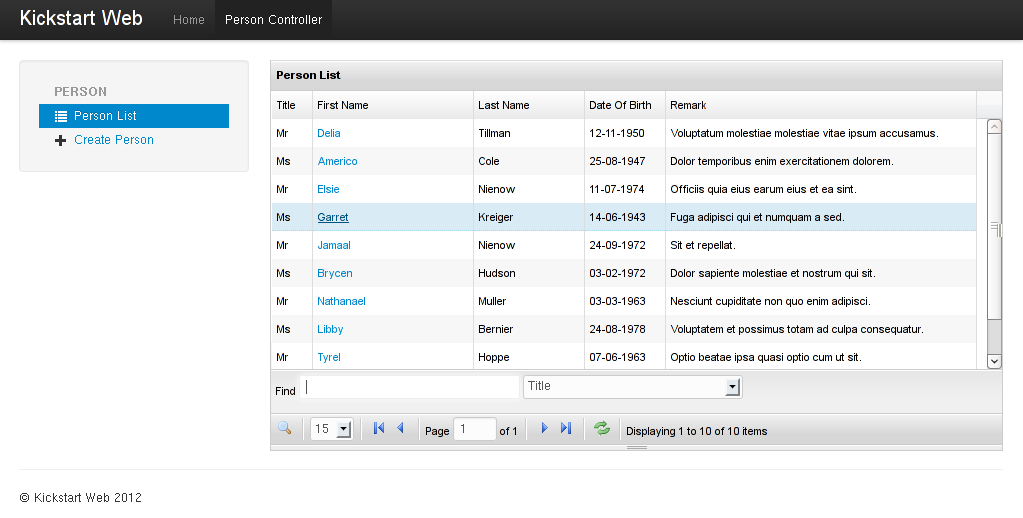
What if you can incorporate the powerful JQuery Grid (jqGrid) component like the following screen into your Grails application in just 3 steps?

First of all, the features and codes to be discussed in this blog post was implemented by a Grails plugin known as "jquery-grid" which using jqGrid 4.4.0 released, it don't have any dependency and relationship with Grails jqGrid plugin.

Let's look at how it can be done:
1. In the person/list.gsp, specified the following code block before the </head> tag to import jqGrid resources:
<r:require module="jquery-grid-en"/>
(en is for English, the plugin support internationalization)
2. Render the JQuery Grid in the person/list.gsp using <g:jqueryGrid> tag, for example:
<g:jqueryGrid for="com.vobject.addressbook.Person" properties="title, firstName, lastName, dateOfBirth, remark" columnWidth="50,150,100,100,350" />
3. Implement the corresponding server-side operation which render data as JSON. In the future, server-side code writing will be eliminated as it will be implemented with the help of dynamic-controller plugin like the Flexigrid example.

Done! You will see the person list render as JQuery Grid component in the picture above after you run "grails run-app".

A great feature of the plugin is embedded-inline-editable grid support which allowed you to use the grid component in detail section of the Master-Detail form, for example the Communication List in the following screen:
The embedded-inline-editable grid support add new row to the grid as well as delete multiple selected rows. The <g:jqueryGrid> tag syntax is similar to the previous one with additional type attribute, please see the sample code below:
<g:jqueryGrid for="com.vobject.addressbook.Communication" properties="type, value" type="embedded-inline-editable" rowNum="5" width="595" />

The jquery-grid plugin implemented the following features:
  • Sort by column
  • Delete selected rows
  • Filter by column(s)
  • Advance search
  • Select all rows
  • embedded-inline-editable grid with "Add Row" and "Delete Row(s)" button and jquery-validation-ui plugin integration.
  • Show AJAX dialog and submit AJAX form (eg: Create Person and Edit Person screen)
(You can see the features above in the slides I published to slideshare)

I'd love to hear your comments!

Sunday, July 22, 2012

Simplifying Grails Flexigrid Integration

Would you like to incorporate the great Flexigrid component like the following picture into your Grails application?


Let's look at how it can be done easily in just 3 steps:
1. In the person/list.gsp, specified the following code block before the </head> tag to import flexigrid resources:
<r:require module="flexigrid"/>
2. Render the flexigrid in the person/list.gsp using <g:flexigrid> tag, for example:
<g:flexigrid for="com.vobject.addressbook.Person" properties="title, firstName, lastName, dateOfBirth, remark" />  
3. Enabled the Flexigrid support for the PersonController by adding the following configuration to the Config.groovy file:
grails.plugins.dynamicController.mixins = [
 'com.vobject.flexigrid.FlexigridControllerMixin':'com.vobject.addressbook.PersonController'
]
Done! You will see the person list render as Flexigrid component in the picture above after you run "grails run-app".  The <g:flexigrid> tag will render the first column as link and all columns with equal width by default.

Let's do some customization, I want to enabled link for the First Name column instead of Title column and custom width for each column like the following picture:


It is as simple as specify the linkProperty and columnWidth attribute, please see the following code:
<g:flexigrid for="com.vobject.addressbook.Person" properties="title, firstName, lastName, dateOfBirth, remark" linkProperty="firstName" columnWidth="30, 150, 100, 70, 300"/>

Behind The Scene

The codes above was implemented by a Grails plugin known as "flexigrid" by refer to the blog post "Using Flexigrid in Grails Web Applications " to further simplifying Grails Flexigrid integration. It was depends on dynamic-controller plugin. Many thanks to kindness of Ronillo Ang for the writing and Burt for the creation of dynamic controller plugin.