Tuesday, March 2, 2021

Flutter Widgets Explorer Go Live!

I would like to announce that the Flutter Widgets Explorer app just released to Google Play!


It is important milestone to me as it is the first mobile application I published to the Google Play Store.

Thanks for your patient and reading till here. You are invited to fork the fluwix github repo, add your code and send me pull request. The key takeaways are you can showcase your code live in an Android app, Fluwix.com and embedded HTML (as iframe) in your blog post. We will take care the hassles of managing the deployment, production and marketing for you. If you're interested, please submit your idea of showcase.

Are you facing any problem with your Flutter development? Please answer the 3 questions Flutter Development Survey as we might have the solution to your problem. 

By the way, you can install the Fluwix (formerly Flutter Widgets Explorer) app to your android phone by clicking on the following image link:

Get it on Google Play
Kindly raise an issue if you have any problem running the Fluwix on your mobile or web.

Thank you for your support. :)

Oh yeah, I almost forgot to mention that the changes made for publishing to android is in publish_android branch of the https://github.com/limcheekin/fluwix. Many thanks to the creator of flutter_launcher_icons and flutter_native_splash package, it greatly simplified the process of getting my app ready to publish.

Saturday, February 27, 2021

Flutter Widgets Explorer: The Animate Icons

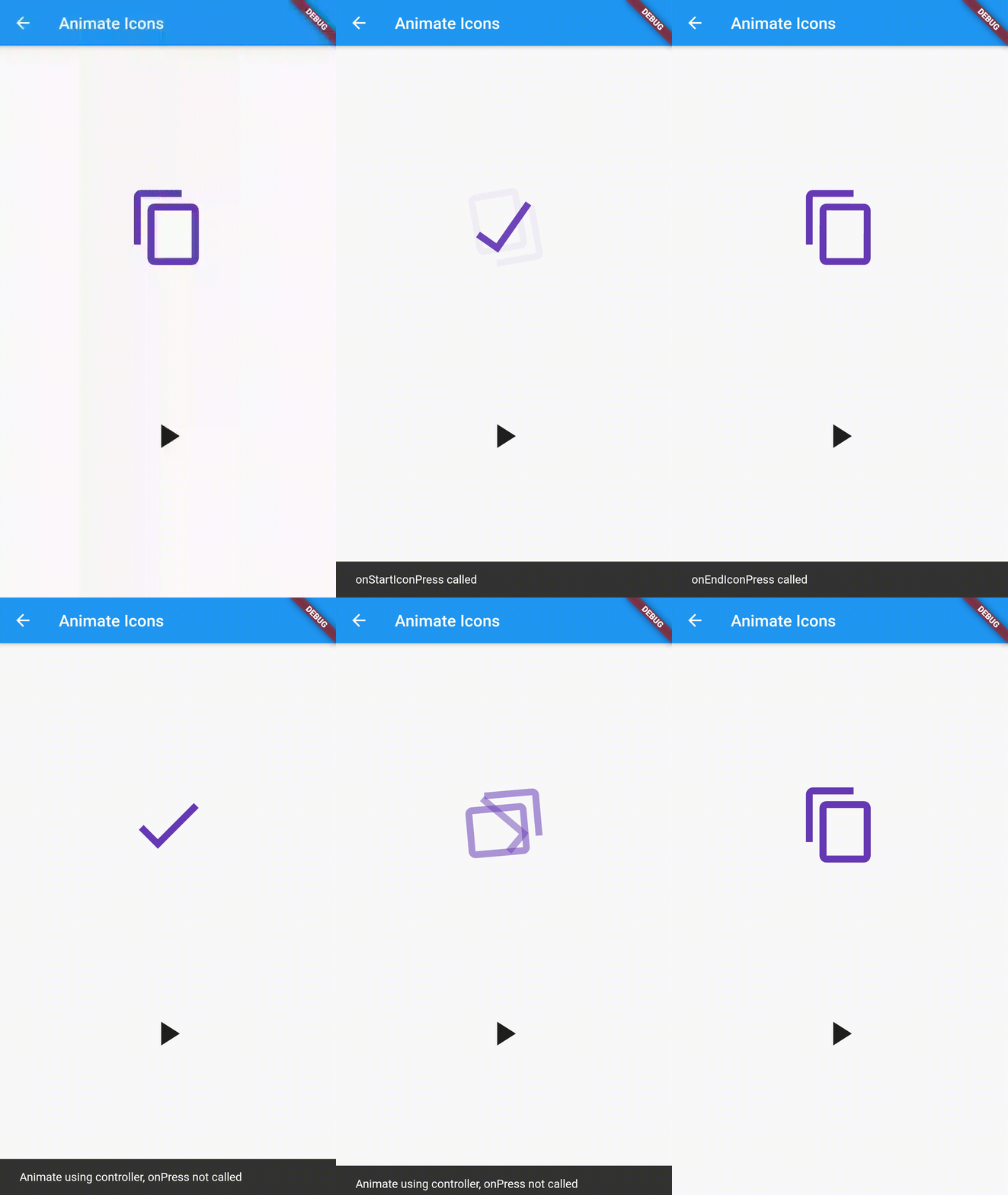
Happy Weekend! The animated icon will enhance user interaction with the app. Unluckily, the built-in Flutter AnimatedIcon class is too limited, only pre-defined set of icons can be animated.

Thanks to animate_icons package, it animates any two icons you preferred.

A picture is worth a thousand words:-

Thanks for your patient and reading till here. You are invited to fork the fluwix github repo, add your code and send me pull request. The key takeaways are you can showcase your code live in an Android app, Fluwix.com and embedded HTML (as iframe) in your blog post. We will take care the hassles of managing the deployment, production and marketing for you. If you're interested, please submit your idea of showcase.

Are you facing any problem with your Flutter development? Please answer the 3 questions Flutter Development Survey as we might have the solution to your problem. 

By the way, you can install the Fluwix (formerly Flutter Widgets Explorer) app to your android phone by clicking on the following image link:

Get it on Google Play
Kindly raise an issue if you have any problem running the Fluwix on your mobile or web.

If you are interested to reuse the source code of the screen, please check out the animated_icons branch of the git repository hosted at https://github.com/limcheekin/fluwix. Feel free to fork the repository and send me pull request.

I'd love to hear from you. :)

Wednesday, February 24, 2021

Flutter Widgets Explorer: The Syntax View


The syntax view is important for code sharing purpose, you can copy and paste the code into your Flutter project and test it out. I hope it saves you some effort and time on typing.

A picture is worth a thousand words:-


Thanks for your patient and reading till here. You are invited to fork the fluwix github repo, add your code and send me pull request. The key takeaways are you can showcase your code live in an Android app, Fluwix.com and embedded HTML (as iframe) in your blog post. We will take care the hassles of managing the deployment, production and marketing for you. If you're interested, please submit your idea of showcase.

Are you facing any problem with your Flutter development? Please answer the 3 questions Flutter Development Survey as we might have the solution to your problem. 

By the way, you can install the Fluwix (formerly Flutter Widgets Explorer) app to your android phone by clicking on the following image link:

Get it on Google Play
Kindly raise an issue if you have any problem running the Fluwix on your mobile or web.

If you are interested to reuse the source code of the screen, please check out the syntax_view branch of the git repository hosted at https://github.com/limcheekin/fluwix. Feel free to fork the repository and send me pull request.

I'd love to hear from you. :)

Tuesday, February 2, 2021

Flutter Widgets Explorer: The Chart & Data Table


By standing on the shoulder of the giant, I managed to display the real world quarterly result data (which loaded from a JSON file) as combo chart and tabular format using the charts_flutter package and the DataTable widget without too much hassle.  

A picture is worth a thousand words:

Thanks for your patient and reading till here. You are invited to fork the fluwix github repo, add your code and send me pull request. The key takeaways are you can showcase your code live in an Android app, Fluwix.com and embedded HTML (as iframe) in your blog post. We will take care the hassles of managing the deployment, production and marketing for you. If you're interested, please submit your idea of showcase.

Are you facing any problem with your Flutter development? Please answer the 3 questions Flutter Development Survey as we might have the solution to your problem. 

By the way, you can install the Fluwix (formerly Flutter Widgets Explorer) app to your android phone by clicking on the following image link:

Get it on Google Play
Kindly raise an issue if you have any problem running the Fluwix on your mobile or web.

If you are interested to reuse the source code of the screen, please check out the chart_data_table branch of the git repository hosted at https://github.com/limcheekin/fluwix. Feel free to fork the repository and send me pull request.

I'd love to hear from you! :)

Saturday, January 30, 2021

Flutter Widgets Explorer: The Charts Gallery

Happy weekend!

The charts gallery screen is taken from official example of the charts_flutter package. Full credit is given to the development team of charts_flutter.

A picture is worth a thousand words:


You can see the data visualization capability of the flutter package by running the code in emulator or simply check out the online charts gallery.

Thanks for your patient and reading till here. You are invited to fork the fluwix github repo, add your code and send me pull request. The key takeaways are you can showcase your code live in an Android app, Fluwix.com and embedded HTML (as iframe) in your blog post. We will take care the hassles of managing the deployment, production and marketing for you. If you're interested, please submit your idea of showcase.

Are you facing any problem with your Flutter development? Please answer the 3 questions Flutter Development Survey as we might have the solution to your problem. 

By the way, you can install the Fluwix (formerly Flutter Widgets Explorer) app to your android phone by clicking on the following image link:

Get it on Google Play
Kindly raise an issue if you have any problem running the Fluwix on your mobile or web.

If you are interested to reuse the source code of the screen, please check out the charts_gallery branch of the git repository hosted at https://github.com/limcheekin/fluwix. Feel free to fork the repository and send me pull request.

I'd love to hear from you! :)